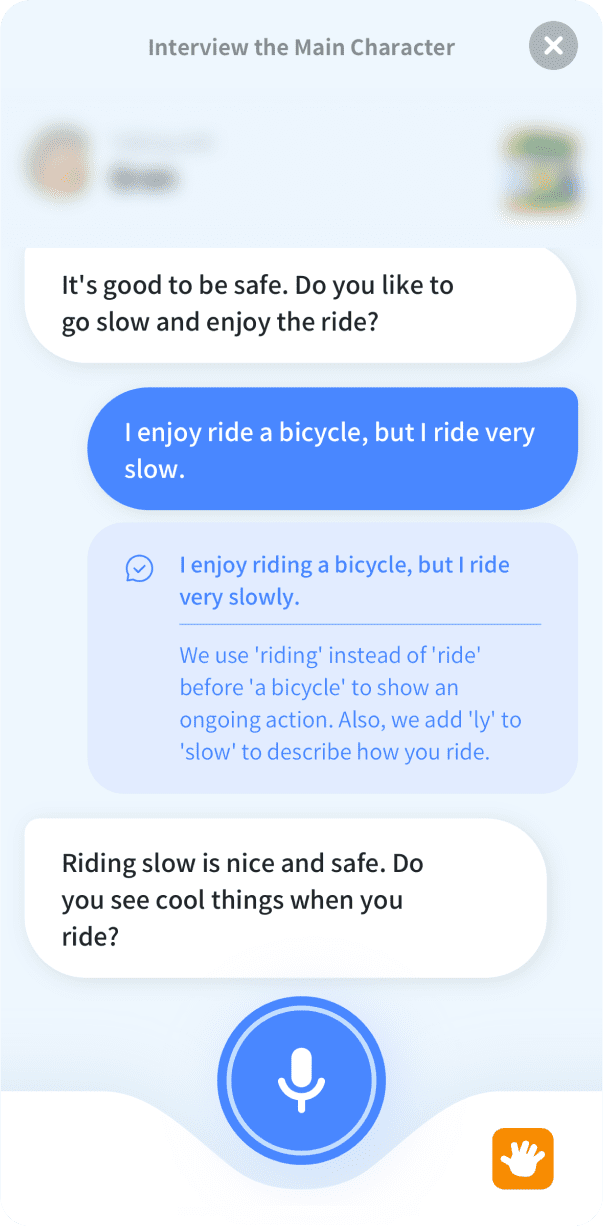
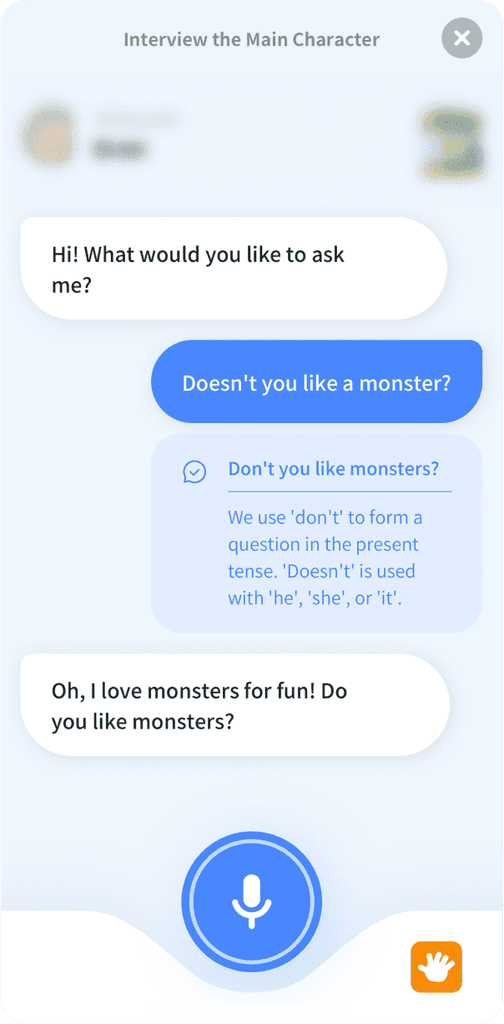
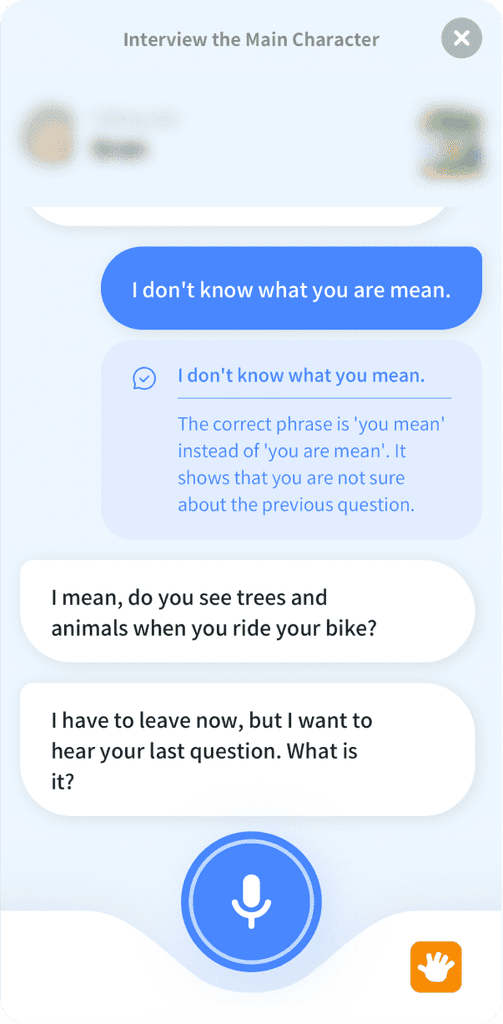
Conversational AI English tutor LAURA

Grammar Correction

Grammar Correction

© iPorfolio

© iPorfolio

© iPorfolio

Web, App (iOS, Android)

Web, App (iOS, Android)

Web, App (iOS, Android)

Related Project

Realated Project

Looking at the AI Tutor LAURA project first will provide a better understanding of this project.

Conversational AI Tutor LAURA

Summary

Internally, there was a recognition of the need to enhance the product's competitiveness based on the business context. LAURA includes various activities, some of which involve conversing with LAURA, which provides feedback on the user’s grammatical errors. However, in certain free conversation activities, grammatical errors are not corrected as they are perceived as part of a single ongoing conversation. This results in users having difficulty receiving feedback, and parents or teachers must correct grammatical errors, which is not always feasible immediately. Based on these issues, the goal to add a grammar correction feature was established. Based on this goal, we derived conclusions through competitor research and hypotheses about interaction methods. Users should be able to see grammar correction feedback in free conversation activities without necessarily involving teachers or parents. They should also have the option to choose whether to view the feedback or not. This approach aims to avoid disrupting user motivation and allows users to focus more effectively on their English learning.

Responsibility

Responsibility

Responsibility

Creating Impact from an Agreed Starting Point

Creating Impact from an Agreed Starting Point

Creating Impact from an Agreed Starting Point

Through competitive research, we identified that grammar correction features were offered in various forms by other companies. The design direction could vary depending on the depth of the grammar feedback provided. However, during our kickoff meeting, we had reached a clear consensus that the feature should be implemented within the chat screen and presented in a simple, user-friendly manner. This provided a well-defined starting point for my work, which I continuously developed and guided towards consensus.

Through competitive research, we identified that grammar correction features were offered in various forms by other companies. The design direction could vary depending on the depth of the grammar feedback provided. However, during our kickoff meeting, we had reached a clear consensus that the feature should be implemented within the chat screen and presented in a simple, user-friendly manner. This provided a well-defined starting point for my work, which I continuously developed and guided towards consensus.

Through competitive research, we identified that grammar correction features were offered in various forms by other companies. The design direction could vary depending on the depth of the grammar feedback provided. However, during our kickoff meeting, we had reached a clear consensus that the feature should be implemented within the chat screen and presented in a simple, user-friendly manner. This provided a well-defined starting point for my work, which I continuously developed and guided towards consensus.

Establishing Criteria in the Design Process

Establishing Criteria in the Design Process

Establishing Criteria in the Design Process

One challenge was determining the label name for the grammar correction button. Since our internal UX writing standards were almost nonexistent, I created two guidelines, combining them with our project goals. Additionally, the amount of grammar feedback needed to be limited within the prompt. I led mobile testing, focusing on the smallest devices, and successfully derived the final results.

One challenge was determining the label name for the grammar correction button. Since our internal UX writing standards were almost nonexistent, I created two guidelines, combining them with our project goals. Additionally, the amount of grammar feedback needed to be limited within the prompt. I led mobile testing, focusing on the smallest devices, and successfully derived the final results.

One challenge was determining the label name for the grammar correction button. Since our internal UX writing standards were almost nonexistent, I created two guidelines, combining them with our project goals. Additionally, the amount of grammar feedback needed to be limited within the prompt. I led mobile testing, focusing on the smallest devices, and successfully derived the final results.

Existing Users

Existing Users

Existing Users

With the framework we developed, users were able to study English much more efficiently using LAURA. However, as seen from the User Test results of LAURA version 1, when children used LAURA and engaged in conversations without the help of parents or teachers, they experienced discomfort due to the lack of feedback.

Unawareness of Errors

Unawareness of Errors

Unawareness of Errors

Many users fail to recognize grammatical mistakes during speaking activities. In activities like 'Sentence Practice' or 'Quiz', which involve review tasks, LAURA directly corrects the user's speech when it's grammatically incorrect. However, in open speech activities such as 'Roleplay' or 'Interview the Main Character', users find it difficult to receive feedback even if they speak with grammatical errors. This lack of awareness limits their opportunity to correct mistakes and learn effectively.

Many users fail to recognize grammatical mistakes during speaking activities. In activities like 'Sentence Practice' or 'Quiz', which involve review tasks, LAURA directly corrects the user's speech when it's grammatically incorrect. However, in open speech activities such as 'Roleplay' or 'Interview the Main Character', users find it difficult to receive feedback even if they speak with grammatical errors. This lack of awareness limits their opportunity to correct mistakes and learn effectively.

Many users fail to recognize grammatical mistakes during speaking activities. In activities like 'Sentence Practice' or 'Quiz', which involve review tasks, LAURA directly corrects the user's speech when it's grammatically incorrect. However, in open speech activities such as 'Roleplay' or 'Interview the Main Character', users find it difficult to receive feedback even if they speak with grammatical errors. This lack of awareness limits their opportunity to correct mistakes and learn effectively.

Dependence on External Help

Dependence on External Help

Dependence on External Help

Without immediate feedback, users had to rely on teachers or parents to point out their errors. This dependency slowed down the learning process and reduced opportunities for independent correction.

Without immediate feedback, users had to rely on teachers or parents to point out their errors. This dependency slowed down the learning process and reduced opportunities for independent correction.

Without immediate feedback, users had to rely on teachers or parents to point out their errors. This dependency slowed down the learning process and reduced opportunities for independent correction.

Inconsistent Learning

Inconsistent Learning

Inconsistent Learning

Since users didn't always receive timely or actionable feedback, they struggled to apply the grammar rules they had learned during real conversations, creating a disconnect between learning and practical use.

Since users didn't always receive timely or actionable feedback, they struggled to apply the grammar rules they had learned during real conversations, creating a disconnect between learning and practical use.

Since users didn't always receive timely or actionable feedback, they struggled to apply the grammar rules they had learned during real conversations, creating a disconnect between learning and practical use.

Problems

Problems

Problems

Lack of User Feedback

Lack of User Feedback

Lack of User Feedback

Users often fail to recognize grammatical mistakes during speaking activities. Due to insufficient feedback, opportunities to correct these errors are limited.

Users often fail to recognize grammatical mistakes during speaking activities. Due to insufficient feedback, opportunities to correct these errors are limited.

Users often fail to recognize grammatical mistakes during speaking activities. Due to insufficient feedback, opportunities to correct these errors are limited.

Issue of Immediate Grammar Correction

Issue of Immediate Grammar Correction

Issue of Immediate Grammar Correction

There is a lack of methods for users to receive instant feedback when they make mistakes. They often rely on assistance from teachers or parents. However, users would benefit more from real-time correction to improve their learning effectively.

There is a lack of methods for users to receive instant feedback when they make mistakes. They often rely on assistance from teachers or parents. However, users would benefit more from real-time correction to improve their learning effectively.

There is a lack of methods for users to receive instant feedback when they make mistakes. They often rely on assistance from teachers or parents. However, users would benefit more from real-time correction to improve their learning effectively.

Problem of Learning Burden

Problem of Learning Burden

Problem of Learning Burden

Existing grammar correction methods are often complicated or require detailed explanations, which can feel burdensome for users. A simple and intuitive correction method based on their current response is needed.

Existing grammar correction methods are often complicated or require detailed explanations, which can feel burdensome for users. A simple and intuitive correction method based on their current response is needed.

Existing grammar correction methods are often complicated or require detailed explanations, which can feel burdensome for users. A simple and intuitive correction method based on their current response is needed.

Gap Between Learning Goals and Real-World Application

Gap Between Learning Goals and Real-World Application

Gap Between Learning Goals and Real-World Application

Although users learn grammar, they often struggle to apply that knowledge effectively in real conversations. A feedback system is required to bridge this gap and enhance their practical language use.

Although users learn grammar, they often struggle to apply that knowledge effectively in real conversations. A feedback system is required to bridge this gap and enhance their practical language use.

Although users learn grammar, they often struggle to apply that knowledge effectively in real conversations. A feedback system is required to bridge this gap and enhance their practical language use.

Disruption of Conversation Flow

Disruption of Conversation Flow

Disruption of Conversation Flow

When users make grammatical errors in their speech, the conversation with LAURA may not proceed smoothly, or error messages may be displayed. This issue also contributes to the problem.

When users make grammatical errors in their speech, the conversation with LAURA may not proceed smoothly, or error messages may be displayed. This issue also contributes to the problem.

When users make grammatical errors in their speech, the conversation with LAURA may not proceed smoothly, or error messages may be displayed. This issue also contributes to the problem.

Project Goals

Project Goals

Project Goals

Provide Immediate Feedback

Offer real-time feedback to ensure smooth and effective conversations for users.

Enhance User Motivation

Increase user motivation and encourage continuous engagement with the learning process.

Advance Grammar Correction Features

Elevate LAURA’s grammar correction functionality to maximize learning effectiveness and improve the quality of the product.

Impact

Since the grammar correction feature was not applied to all activities, I closely monitored the usage frequency of activities where this feature was enabled. To assess whether users were re-engaging with the feature, I tracked the increase in the average number of utterances following the use of the grammar correction function. We also considered the usage frequency of active users as a key metric in assessing our primary goal of reducing a decline in learning motivation.

+155

%

Activity Execution
Frequency

Activity Execution Frequency

+60

%

Average Utterance
Count

Average Utterance Count

+24

+24

+24

%

%

%

Usage Frequency
of Active Users
(11+ uses)

Usage Frequency
of Active Users
(11+ uses)

Usage Frequency of Active Users
(11+ uses)

Competitive Research

Competitive
Research

To evaluate user engagement and learning effectiveness differently, competitor research was conducted based on two criteria. The goal was to find a balance between providing immediate correction features and maintaining immersive learning experiences.

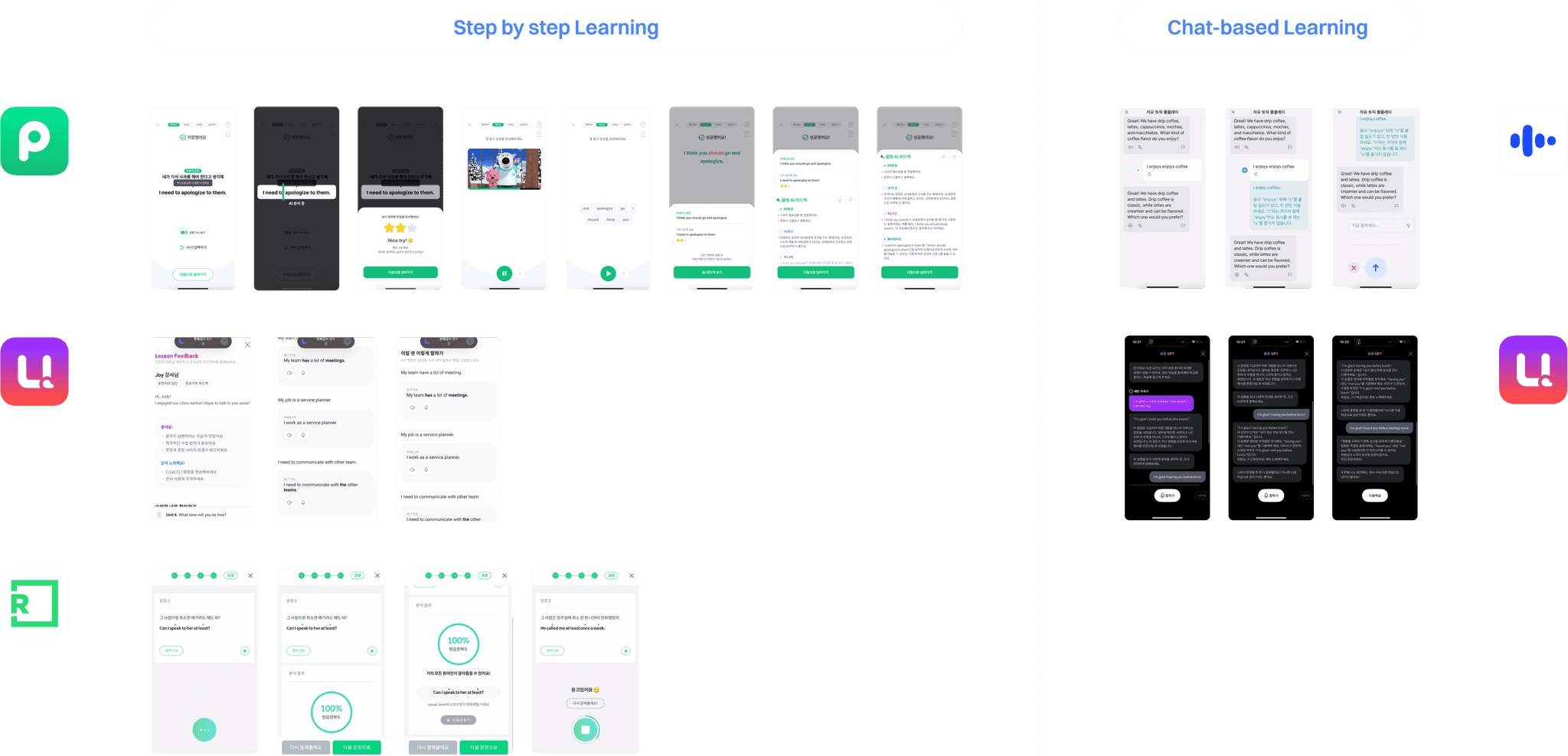
Step by step Learning

Although this approach does not use a chat format, it offers feedback in a structured, step-by-step manner. This allows users to progress through learning stages and systematically recognize their errors at each step. This method supports gradual learning and helps users address issues in a more organized way.

  • Instead of being optional, it is provided as a required step with more detailed content.

  • In services that focus on learning words and sentences, the system checks how well the user applied previously learned content and provides corrections based on that.

  • In services focused on listening and speaking, pronunciation correction is provided.

Chat-based Learning

This approach provides real-time feedback similar to a natural conversation. Users can correct mistakes during the conversation, which helps maintain the flow and simulates a realistic interaction. This method encourages active learning and is effective in addressing incorrect patterns promptly.

This approach provides real-time feedback similar to a natural conversation. Users can correct mistakes during the conversation, which helps maintain the flow and simulates a realistic interaction. This method encourages active learning and is effective in addressing incorrect patterns promptly.

This approach provides real-time feedback similar to a natural conversation. Users can correct mistakes during the conversation, which helps maintain the flow and simulates a realistic interaction. This method encourages active learning and is effective in addressing incorrect patterns promptly.

  • Users are given the option to view corrections through a button, but the button is not intuitively recognizable.

  • Displaying corrections immediately after the user speaks may cause hesitation or fear in making the next attempt.

New Issue!

New Issue!

How users view grammar corrections on the screen?

If users are left to choose, they may overlook checking feedback. On the other hand, if the correction feature is activated and shown immediately after the user speaks, it can disrupt the flow of conversation and reduce their confidence in learning.

Formulating a hypothesis

Laura is a chat-based platform that provides users with corrections on their spoken inputs immediately after they speak. We focused on creating interactions that encourage a narrative of ‘self-motivation’ in learning. To explore this, we analyzed the pros and cons of two different hypotheses.

Laura is a chat-based platform that provides users with corrections on their spoken inputs immediately after they speak. We focused on creating interactions that encourage a narrative of ‘self-motivation’ in learning. To explore this, we analyzed the pros and cons of two different hypotheses.

Laura is a chat-based platform that provides users with corrections on their spoken inputs immediately after they speak. We focused on creating interactions that encourage a narrative of ‘self-motivation’ in learning. To explore this, we analyzed the pros and cons of two different hypotheses.

Hypothesis 1

Hypothesis 1

Hypothesis 1

Users can view grammar corrections immediately after speaking.

Users can view grammar corrections immediately after speaking.

Users can view grammar corrections immediately after speaking.

Advantages
Advantages
Advantages
Instant Feedback
Instant Feedback
Instant Feedback

Users can immediately identify and correct their mistakes, which enhances learning and helps improve English skills in real-time.

Users can immediately identify and correct their mistakes, which enhances learning and helps improve English skills in real-time.

Users can immediately identify and correct their mistakes, which enhances learning and helps improve English skills in real-time.

Efficient Learning
Efficient Learning
Efficient Learning

Immediate correction prevents users from repeating the same mistakes, making it possible to learn as they go.

Immediate correction prevents users from repeating the same mistakes, making it possible to learn as they go.

Immediate correction prevents users from repeating the same mistakes, making it possible to learn as they go.

Improved User Experience

Real-time feedback provides a better user experience, potentially increasing satisfaction with the service.

Real-time feedback provides a better user experience, potentially increasing satisfaction with the service.

Real-time feedback provides a better user experience, potentially increasing satisfaction with the service.

Disadvantages
Disadvantages
Disadvantages
Interrupted Conversation Flow

Real-time correction feedback can disrupt the natural flow of conversation, making it harder for users to stay focused on the dialogue.

Real-time correction feedback can disrupt the natural flow of conversation, making it harder for users to stay focused on the dialogue.

Real-time correction feedback can disrupt the natural flow of conversation, making it harder for users to stay focused on the dialogue.

User Anxiety
User Anxiety
User Anxiety

Constant corrections may cause users to feel anxious about their English skills, potentially leading them to avoid using the service.

Constant corrections may cause users to feel anxious about their English skills, potentially leading them to avoid using the service.

Constant corrections may cause users to feel anxious about their English skills, potentially leading them to avoid using the service.

Lack of Personalization

Providing feedback in the same manner to all users might not fully consider individual learning styles. Some users may prefer feedback after the conversation rather than immediately.

Providing feedback in the same manner to all users might not fully consider individual learning styles. Some users may prefer feedback after the conversation rather than immediately.

Providing feedback in the same manner to all users might not fully consider individual learning styles. Some users may prefer feedback after the conversation rather than immediately.

Hypothesis 2

Hypothesis 2

Users can view grammar corrections after pressing a button.

Users can view grammar corrections after pressing a button.

Users can view grammar corrections after pressing a button.

Hypothesis 2

Hypothesis 2

Advantages
Advantages
Advantages
Maintains Conversation Flow

Grammar correction feedback isn't automatically displayed, so the natural flow of conversation is preserved. Users can check feedback only when they need it.

Grammar correction feedback isn't automatically displayed, so the natural flow of conversation is preserved. Users can check feedback only when they need it.

Grammar correction feedback isn't automatically displayed, so the natural flow of conversation is preserved. Users can check feedback only when they need it.

Enhanced User Control

Users have the option to decide whether to receive feedback. This helps prevent anxiety that might arise from unnecessary corrections.

Users have the option to decide whether to receive feedback. This helps prevent anxiety that might arise from unnecessary corrections.

Users have the option to decide whether to receive feedback. This helps prevent anxiety that might arise from unnecessary corrections.

Personalized Learning

By checking feedback only when needed, users can keep a learning pace and style that suits them. This improves the user experience and enhances learning effectiveness.

By checking feedback only when needed, users can keep a learning pace and style that suits them. This improves the user experience and enhances learning effectiveness.

By checking feedback only when needed, users can keep a learning pace and style that suits them. This improves the user experience and enhances learning effectiveness.

Positive User Experience

Offering feedback only when users seek it can increase satisfaction with the service, providing them with the freedom to manage their own learning process.

Offering feedback only when users seek it can increase satisfaction with the service, providing them with the freedom to manage their own learning process.

Offering feedback only when users seek it can increase satisfaction with the service, providing them with the freedom to manage their own learning process.

Disadvantages
Disadvantages
Disadvantages
Delayed Feedback
Delayed Feedback
Delayed Feedback

Without immediate feedback, users may miss the chance to correct mistakes on the spot, reducing the effectiveness of real-time learning.

Without immediate feedback, users may miss the chance to correct mistakes on the spot, reducing the effectiveness of real-time learning.

Without immediate feedback, users may miss the chance to correct mistakes on the spot, reducing the effectiveness of real-time learning.

Additional Effort Required

Users might find it inconvenient to click an extra button to view feedback, leading them to neglect checking corrections.

Users might find it inconvenient to click an extra button to view feedback, leading them to neglect checking corrections.

Users might find it inconvenient to click an extra button to view feedback, leading them to neglect checking corrections.

Increased UI Complexity

Adding more buttons to the chat interface can make the UI more complex, potentially causing confusion for users while navigating the interface.

Adding more buttons to the chat interface can make the UI more complex, potentially causing confusion for users while navigating the interface.

Adding more buttons to the chat interface can make the UI more complex, potentially causing confusion for users while navigating the interface.

Outcome

Outcome

Through this process, we decided to provide immediate feedback by displaying the grammar correction feature within the chat flow, which aligns best with our project goals. Additionally, we chose to allow users to view grammar correction details by pressing a button, ensuring that the autonomy of the learning process is not disrupted. This decision is based on the following considerations:

Through this process, we decided to provide immediate feedback by displaying the grammar correction feature within the chat flow, which aligns best with our project goals. Additionally, we chose to allow users to view grammar correction details by pressing a button, ensuring that the autonomy of the learning process is not disrupted. This decision is based on the following considerations:

Through this process, we decided to provide immediate feedback by displaying the grammar correction feature within the chat flow, which aligns best with our project goals. Additionally, we chose to allow users to view grammar correction details by pressing a button, ensuring that the autonomy of the learning process is not disrupted. This decision is based on the following considerations:

Enhanced User Engagement

Enhanced User Engagement

The chat format enables real-time interaction, allowing users to receive immediate feedback on grammatical errors. This keeps the conversation flowing smoothly and maintains ongoing user engagement.

The chat format enables real-time interaction, allowing users to receive immediate feedback on grammatical errors. This keeps the conversation flowing smoothly and maintains ongoing user engagement.

Enhanced User Engagement

The chat format enables real-time interaction, allowing users to receive immediate feedback on grammatical errors. This keeps the conversation flowing smoothly and maintains ongoing user engagement.

Effective Error Correction

Effective Error Correction

Immediate feedback helps users quickly recognize and correct mistakes, preventing the reinforcement of incorrect patterns and enhancing learning effectiveness.

Immediate feedback helps users quickly recognize and correct mistakes, preventing the reinforcement of incorrect patterns and enhancing learning effectiveness.

Effective Error Correction

Immediate feedback helps users quickly recognize and correct mistakes, preventing the reinforcement of incorrect patterns and enhancing learning effectiveness.

Increased Motivation

Increased Motivation

Integrating real-time feedback into a familiar chat interface motivates users to actively engage in the learning process.

Integrating real-time feedback into a familiar chat interface motivates users to actively engage in the learning process.

Increased Motivation

Integrating real-time feedback into a familiar chat interface motivates users to actively engage in the learning process.

Maintained Autonomy in Learning

Maintained Autonomy in Learning

By allowing users to access grammar correction information through a button press, we provide them with the autonomy to review feedback at their own pace. This approach supports a natural learning flow while ensuring users can obtain necessary information as needed.

By allowing users to access grammar correction information through a button press, we provide them with the autonomy to review feedback at their own pace. This approach supports a natural learning flow while ensuring users can obtain necessary information as needed.

Maintained Autonomy in Learning

By allowing users to access grammar correction information through a button press, we provide them with the autonomy to review feedback at their own pace. This approach supports a natural learning flow while ensuring users can obtain necessary information as needed.

New Issues!

What amount grammar-corrected feedback should be?

If there is too much content, it can reduce usability in a chat-based service, especially on small devices like mobile phones. This is because the amount of information that users can see at a glance is significantly reduced.

What kind of emotion should the button label give?

Considering that the button contains a label instead of an icon, it was necessary to choose a label that would not undermine the user's confidence in their learning experience while also encouraging them to accept feedback.

Button Label Name

Solution

Limit the amount of text in prompts

  • Use clear and concise language.

  • Provide responses in a single sentence or a couple of sentences.
Choosing User-Friendly Button Labels

  • I led the discussion with the PM on button label ideation, focusing on the following two criteria.
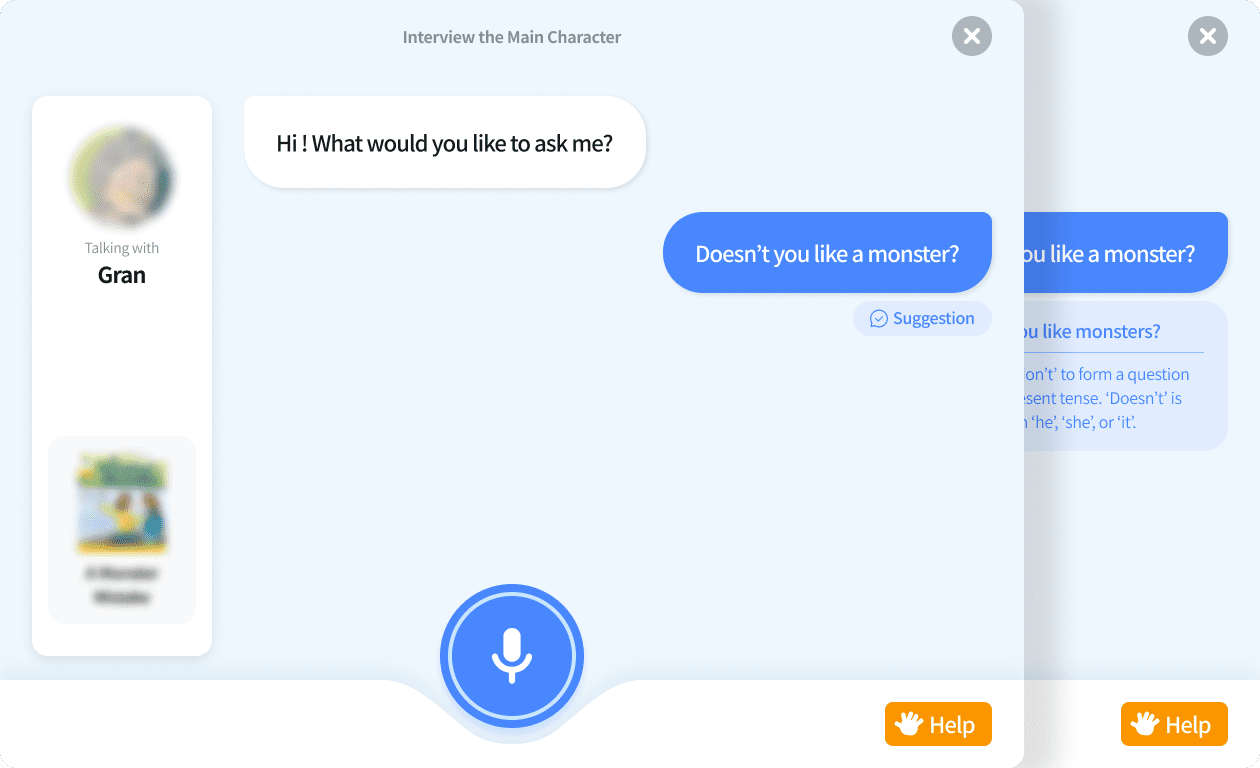
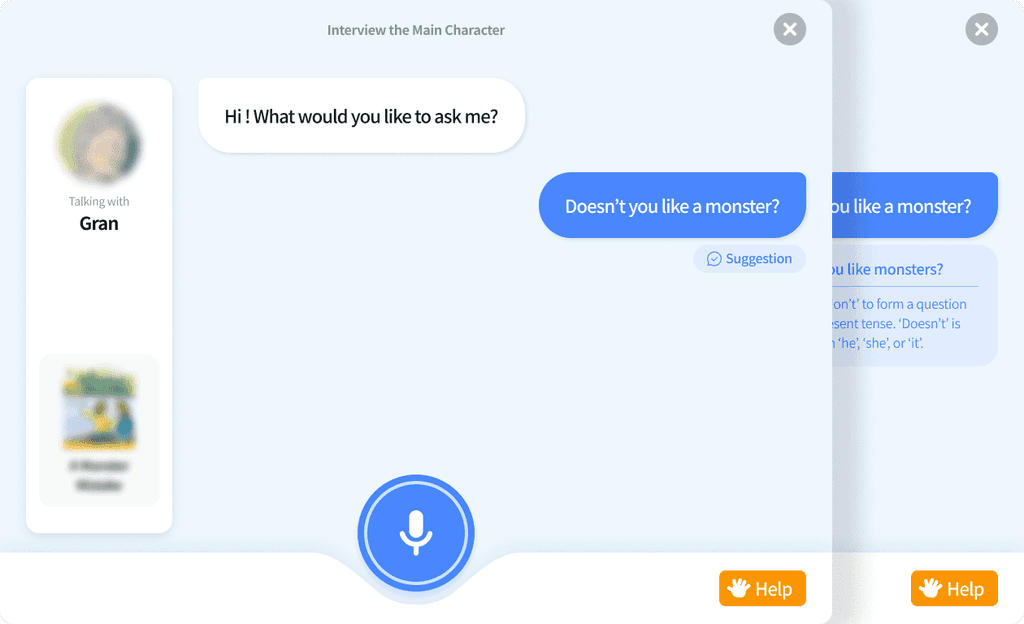
Suggest rather than force

To keep users motivated and engaged, we chose respectful language that guides rather than pushes them into specific actions. It's important not to pressure users, as this could cause unnecessary stress and hurt their overall experience.

To keep users motivated and engaged, we chose respectful language that guides rather than pushes them into specific actions. It's important not to pressure users, as this could cause unnecessary stress and hurt their overall experience.

To keep users motivated and engaged, we chose respectful language that guides rather than pushes them into specific actions. It's important not to pressure users, as this could cause unnecessary stress and hurt their overall experience.

Predictable hint

We aimed to use words that would allow users to anticipate the next step before clicking the button. While it's important to convey value to the user, overloading them with information can sometimes harm usability.

We aimed to use words that would allow users to anticipate the next step before clicking the button. While it's important to convey value to the user, overloading them with information can sometimes harm usability.

We aimed to use words that would allow users to anticipate the next step before clicking the button. While it's important to convey value to the user, overloading them with information can sometimes harm usability.

Feature

Thanks for scrolling!

Next Project